
Ministra Player for Android TV
InfomirVideo Players & Editors
1.942.00 Reviews
- Version
- Varies With Device
- Installs
- 100.00K
- Age Rating
- Everyone
Screenshots
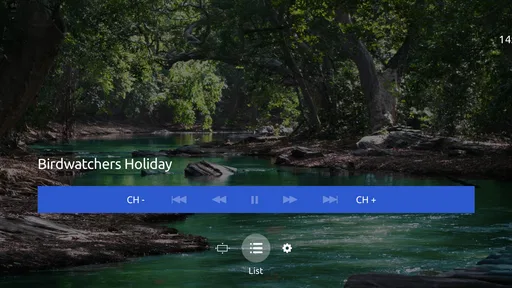
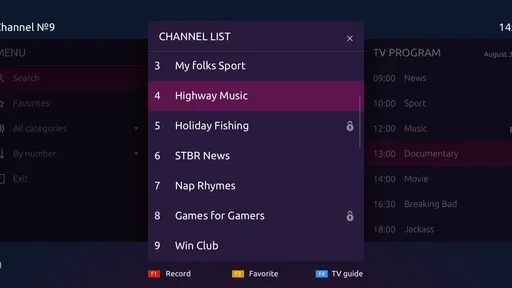
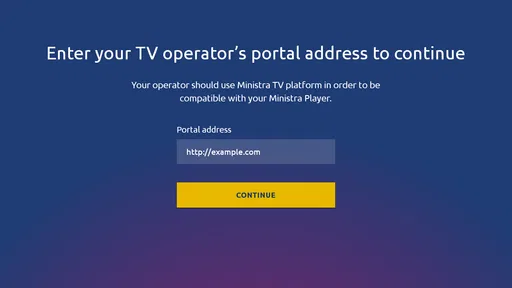
Our Review of Ministra Player for Android TV
 Analysis by Appyee
I approached Ministra Player as an Android TV viewer rather than as a general-purpose media player. That distinction matters. This free app from Infomir is designed to play television and video supplied through an IPTV provider, so its usefulness depends heavily on the service connected to it. It is not the kind of player I would install simply to open every local video file on a television.
My first impression was that the app makes most sense as one part of an IPTV setup. If your provider supports Ministra, the player can give you a television-focused way to reach that service from the sofa. If you are looking for a broad streaming hub, a local-media library, or a polished replacement for every other video app on Android TV, the fit is much narrower.
Where Ministra Player fits on Android TV
The app belongs to the video players and editors category, although the “editor” side is not what defines the experience. Its job is playback. In practical terms, you install it on a compatible Android TV device, connect it to the IPTV environment offered by your provider, and use the television interface to watch the content made available there.
That provider dependency is the most important thing to understand before downloading. Ministra Player is not a catalogue of channels and does not replace an IPTV subscription or service account. I would first ask the provider whether Ministra Player is supported and whether they give specific setup instructions. Installing it without that information can leave you with an app that has no useful content to play.
For a household that already receives television through an Infomir-based or compatible IPTV service, the focused design can be an advantage. You do not have to force a phone-oriented video app into a remote-control environment. The intended screen is the television, and the intended activity is watching provider content from a couch.
For someone who mainly watches YouTube, subscription streaming services, downloaded films, or files stored on a network drive, I would choose a different tool. Those uses call for broad catalogue integration, strong library management, or flexible file support. Ministra Player should be judged as a service-specific front end, not as an all-in-one media centre.
What the first setup really depends on
The key question is not whether the app is free to install. It is whether your IPTV provider has prepared an account or portal that the player can use. I would keep the provider’s login details and setup instructions nearby, and I would avoid guessing server addresses or account fields. A wrong entry can look like an app problem when the real issue is simply an incomplete service configuration.
This is also where the app’s user experience can feel less self-contained than mainstream streaming apps. Netflix-style services guide you from installation to a ready catalogue. With Ministra Player, the useful experience begins only after the provider connection is in place. That is a reasonable trade-off for a service-linked player, but it means the quality of support from the provider matters almost as much as the software on the television.
One practical tip is to test the account on the exact Android TV device where you plan to watch. A setup that works on one screen or through one provider arrangement may not tell you how comfortable the remote navigation will be on another. I would also check that the television is connected to a stable home network before troubleshooting the app. This avoids wasting time treating buffering or sign-in delays as interface faults.
Remote control use is the real test
On a television, small design choices matter more than they do on a phone. I paid attention to whether moving through provider content felt manageable with directional buttons, whether selection states were easy to see from a distance, and whether returning to the previous screen felt predictable. A player can be technically capable and still be tiring if every action requires too many remote presses.
Ministra Player’s value is therefore strongest for viewers who want a direct route from the Android TV home screen to their provider’s television content. It is less compelling for people who expect a rich discovery layer that combines several services, recommendations, personal libraries, and local files in one place.
A useful everyday scenario would be a family that receives television through an IPTV provider and wants to keep viewing simple: turn on the television, open the player, choose the provider’s content, and hand the remote to another family member without explaining a complicated computer-style workflow. In that situation, a dedicated player can be more comfortable than casting from a phone each evening.
Trust, controls, and moments that deserve attention
Because this app sits between a viewer and an IPTV provider, I would separate three questions: who develops the player, what account details the service requires, and what information I choose to enter. The developer shown for the app is Infomir. That gives me a clear name to look for when checking the installation screen and deciding whether the app matches the player recommended by my provider.
The app is free to download, while its listing also shows in-app purchases ranging from less than a dollar to just under thirty-two dollars per item. I would not assume that installing the player itself explains every possible charge. Before approving any purchase, I would read the on-screen wording carefully and confirm whether it relates to the provider’s service, an optional app function, or another account action. On a shared television, that small pause is worthwhile.
The age classification is Everyone, which makes the app broadly suitable from a content-rating perspective. That does not mean every channel or video delivered through an IPTV service is automatically appropriate for every viewer. The player is a delivery tool, so the provider’s catalogue and the household’s own viewing choices remain important.
The app has been available since September 2018 and has passed one hundred thousand installs. Its average rating is 1.9 from 707 ratings, with 42 written reviews. I read that combination as a reason to be cautious rather than as a complete verdict. Ratings can reflect provider compatibility, login problems, device differences, or frustration with service quality, not just the player’s buttons and menus. Still, such a low average means I would not recommend installing it blindly.
My approach would be to treat the rating as a prompt for a controlled test. Install it only when your provider specifically supports it, try the basic sign-in and playback path, and decide quickly whether the experience is stable enough for your household. If the provider cannot explain how the app should be configured, I would not spend money or extensive troubleshooting time trying to force the connection.
Account choices should stay deliberate
When an IPTV player asks for service credentials, I prefer to enter them only in the official app obtained through the normal Android TV installation route. I would not paste a provider password into an unfamiliar companion tool just because it promises easier setup. I would also avoid sharing one account widely unless the provider’s terms and household arrangement clearly allow it.
Another sensible habit is to review the account or sign-out controls after setup, not only when something goes wrong. On a television used by guests, in a rental property, or in a second home, leaving a provider account active can make the next user’s access unnecessarily broad. If the interface offers a clear sign-out or account-removal choice, I would use it before handing over the device. If the provider manages the account separately, I would follow that provider’s removal instructions rather than repeatedly reinstalling the player.
This is one area where user control matters more than convenience. A remembered login saves time, but a deliberate sign-out protects control over a paid television service. I would especially make that choice on shared Android TV hardware, where different family members may have different viewing permissions or spending authority.
Be careful at payment and support boundaries
The presence of optional purchases means I would keep an eye on who is holding the remote when a payment screen appears. Android TV can be used by children, visitors, and several adults, so purchase confirmation should never be treated as a harmless step. I would require the account holder to approve any transaction and would check the amount before continuing.
If playback fails, I would diagnose the problem in layers. First, I would check whether other apps can reach the internet. Next, I would verify the provider account and portal details. Then I would try another channel or video supplied by the same service. This sequence helps distinguish a network issue, a provider-side problem, and a player-specific failure. It is more useful than immediately clearing app data, because clearing data may remove a working configuration and create extra setup work.
I would also record the exact message shown on screen before contacting support. Telling the provider that “it does not work” is less helpful than reporting whether the app opens, accepts the account, displays the catalogue, starts playback, or stops after a short delay. Since Ministra Player is tied to provider content, the provider may need those details to identify whether the account is enabled for this player.
How it compares with usual alternatives
Compared with casting from a phone, Ministra Player can be more convenient for regular television viewing because the remote remains the main control. Casting is often better when you want to send one-off videos from a mobile device, but it introduces another battery, another app, and another connection step. For a household that watches the same IPTV service every day, a dedicated television player is the cleaner routine.
Compared with a general media player, Ministra Player is more specialised. A general player may be preferable for USB files, network shares, subtitles, unusual formats, or a personal film collection. I would not choose Ministra Player for those tasks unless the provider’s service is also the main reason I am using the television.
Compared with large streaming platforms, the difference is even clearer. Mainstream services usually control the catalogue, account flow, recommendations, and playback environment from end to end. Ministra Player depends on an external IPTV provider, so the available channels, reliability, and account experience are shaped by that relationship. The benefit is direct access to the provider’s television offering; the drawback is that the player cannot solve a weak provider service.
That trade-off also affects troubleshooting. With a normal streaming subscription, contacting the platform often covers the whole experience. With this player, I would be prepared to work out whether the issue belongs to Infomir’s software, the Android TV device, the home network, or the IPTV provider. Users who dislike that division of responsibility may be happier with a single-platform streaming service.
Who should use it, and who should pass
I would recommend trying Ministra Player to someone whose IPTV provider explicitly supports it and who wants a straightforward Android TV route to provider-supplied television and video. It is also a reasonable option for viewers who prefer using a remote rather than casting from a phone, provided the account setup is clear and the basic playback test goes well.
I would advise skipping it if you do not already have a compatible IPTV service. I would also look elsewhere if your priority is a unified library for local files and multiple streaming subscriptions, or if you need a highly polished discovery experience independent of a provider account. The low average rating makes a trial sensible, but it does not justify assuming the app will work for every device and service combination.
For families, I would make the decision after testing three moments: opening the app, starting a typical channel or video, and returning to the content list with the remote. Those simple checks reveal more than an installation alone. I would then test the account on the television’s usual network at the time the household normally watches, because a player that feels fine during a quiet afternoon may expose provider or network weaknesses during busier viewing periods.
My cautious verdict
Ministra Player is a focused Android TV app rather than a universal entertainment solution. I like the basic idea of giving an IPTV provider’s customers a television-oriented playback route, and I can see why that is preferable to casting for everyday viewing. The free installation and Everyone age rating make trying it straightforward, while Infomir is clearly identified as the developer.
My recommendation remains conditional. The app’s success depends on provider compatibility, account setup, network conditions, and the particular Android TV device. The low average rating and the presence of optional purchases are reasons to pay attention during installation and use, not reasons to enter credentials or approve charges without reading the screen.
If your provider tells you to use this player, I would test it carefully and keep control of the account and payment steps. If you are simply searching for the best general video player for Android TV, I would choose a broader alternative instead. The right question is not whether Ministra Player replaces every media app, but whether it gives your IPTV service a dependable and manageable place on your television.
Verdict
Strengths of Ministra Player for Android TV
- Supports live TV, video-on-demand, and archive content in one app.
- Designed for Android TV screens with a remote-friendly interface.
- Can display channel guides and program information when provided by the service.
- Works with playlists and portals configured by compatible IPTV providers.
- Playback settings can be adjusted to suit different network conditions.
Limitations of Ministra Player for Android TV
- Requires an IPTV provider account or portal; it does not include channels itself.
- Features and stability depend heavily on the provider’s server and playlist setup.
- Some content may load slowly or buffer on weaker internet connections.
- The interface can feel basic compared with newer streaming platforms.
- Compatibility varies between providers, devices, and Android TV versions.
Similar Picks in This Category
View All
Google TV
Google LLC3.9

iTunes
Apple4.7

YouTube
Google LLC3.8

MX Player
Amazon Mobile LLC4.2

CapCut - Video Editor
Bytedance Pte. Ltd.3.5

PLAYit-All in One Video Player
PLAYIT TECHNOLOGY PTE. LTD.4.5
Frequently Asked Questions
What is Ministra Player for Android TV used for?
Ministra Player is an Android TV application designed to play television channels, video-on-demand content, movies, series, and other media provided by a compatible Ministra TV service. It is not usually a standalone streaming service with its own catalog. You generally need access credentials or a subscription from a supported IPTV or telecommunications provider before the application can display content.
How do I log in to Ministra Player on my Android TV?
After installing the app from a compatible source, open Ministra Player and follow the on-screen setup instructions. Depending on the provider, you may need to enter an account name, password, portal address, activation code, or another service-specific detail. Login information is normally supplied by your IPTV or television operator, so the app itself cannot provide credentials or activate unsupported services.
Does Ministra Player require a subscription or separate service account?
Yes, in most cases Ministra Player requires an active account with a provider that uses the Ministra TV platform. Installing the application alone does not unlock live channels or on-demand programming. Availability, pricing, channel packages, parental controls, and supported features depend on the provider. Before downloading, confirm that your television operator officially supports Ministra Player for Android TV.
What equipment and internet connection are needed for reliable playback?
You need an Android TV device, television, or compatible set-top box that meets the application’s requirements, along with a stable internet connection. Live television and high-definition video work best over dependable Wi-Fi or Ethernet, while slower or congested connections may cause buffering, reduced picture quality, or interruptions. Using Ethernet is often preferable when the router and TV are nearby.
What should I do if channels or videos do not play correctly?
First, check that your subscription is active, your login details are correct, and the provider’s portal or service is operating normally. Restarting the app, Android TV device, and router can resolve temporary connection problems. You should also install available app and system updates. If only certain channels are missing or playback remains unavailable, contact your IPTV provider because access and content errors are commonly account- or server-related.
